Assigning & Managing Subscriptions to Students
Comprehensive highlight on how the Seller (Admin) assigns subscription days and how the system charges the Seller's wallet.
Subscription management is a critical administrative task. As a Seller, you have full control over how many days of access a student receives. Every subscription you assign is instantly charged to your Seller Wallet based on the portal's daily rate.
1. When to Assign a Subscription
Subscriptions are assigned only after a student has successfully enrolled in your Seller Portal.
Unlike the onboarding process (where you simply invite a student to join), subscription management is the separate action of granting that student study time and access to specific exam materials.
2. Using the "Give Access" Tool
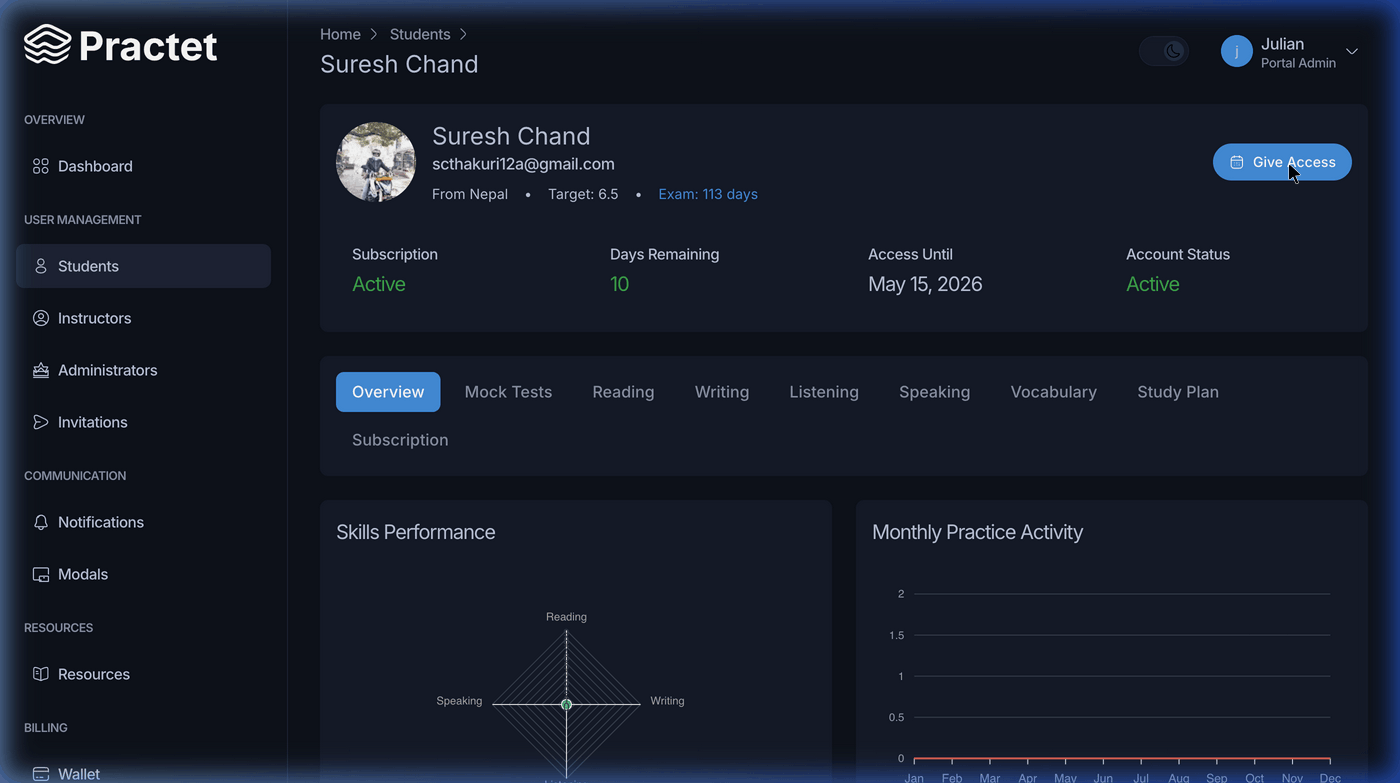
To assign a subscription, navigate to the student's profile (Students > View Details).
Step-by-Step Instructions:
- Locate Button: In the top right header of the student profile, click the Give Access button.
- Open Modal: This will launch the subscription configuration form.
Step 3: Detailed Configuration Fields
The modal provides a real-time calculation of costs based on your portal's settings:
- Number of Days: Enter how many days of access you wish to grant (e.g.,
30,60,90). - Wallet Balance: Displays your current available funds.
- Rate: The fixed daily price for the subscription (e.g.,
$0.54 / Day). - Deduction: The total amount that will be subtracted from your wallet (
Days×Rate). - Balance After: A preview of what your wallet balance will be after the transaction is processed.
3. Wallet Validation & Logic
- Insufficient Funds: If the "Total Deduction" exceeds your current wallet balance, the system will display an "Insufficient wallet balance" error in red. You must top up your wallet before proceeding.
- Instant Activation: Upon clicking Confirm, the student's expiry date is immediately extended, and the funds are deducted from your account.
- Multiple Subscriptions: If a student has multiple courses, ensure you are granting access to the intended curriculum.
[!IMPORTANT] No Refund Policy: Subscription grants are processed in real-time and deductions are final. Always verify the Number of Days and the Total Deduction amount before clicking confirm.
You might also find these helpful
Still need help?
Couldn't find what you were looking for? Our support team is ready to assist you with any questions.Contact us